
How to Identify a Plant or Flower From a Photo
Photograph distinctive features, get a suggested name, then compare the result. Use this checklist for houseplants, flowers and outdoor plants.
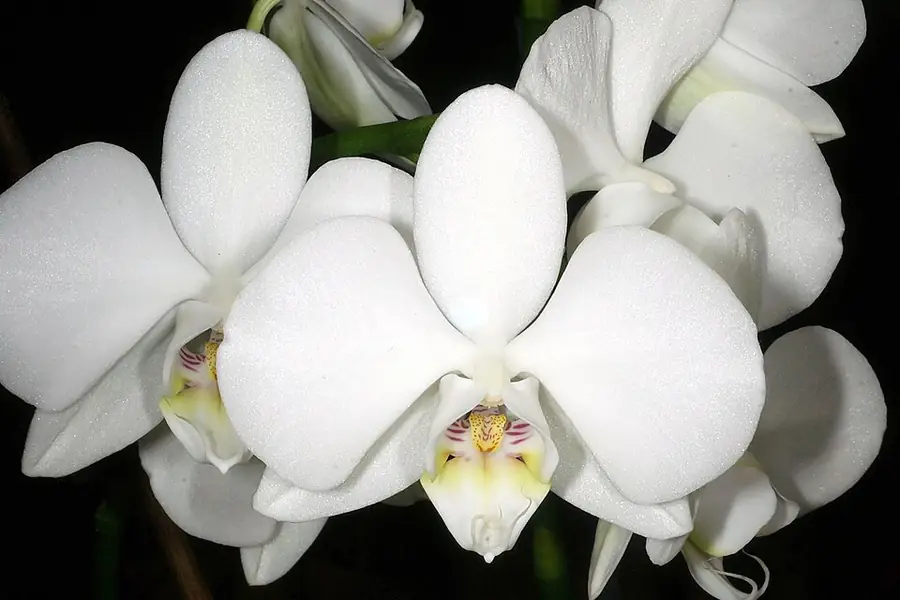
Photo Orchi · CC BY-SA 3.0 via Wikimedia Commons
To identify a plant from a photo, capture a distinctive feature, ask an identification tool for a suggested name, and verify it against the rest of the plant. A clear flower, a leaf on its stem and a whole-plant view give you a better set of evidence than one distant photograph.
How to identify a flower from a photo
- Photograph the flower face-on. Keep the center and petal edges sharp. Tap the subject to focus and check the picture before moving on.
- Take a side view. Include where the flower joins its stalk; avoid cropping every part except the petals.
- Photograph leaves on the same plant. Keep their arrangement on the stem visible. A nearby leaf may belong to a different species.
- Add the whole plant. Show whether it is a shrub, climbing vine, rosette or upright stem. Note where it is growing.
- Compare the proposed name. Look beyond color: compare flower structure, leaf shape and growth habit. If features disagree, keep the identification tentative.
The iNaturalist observation guidance recommends documenting multiple features of one organism. You can apply that approach when gathering photographs for any identification tool; it does not require the tool to accept all the images in one submission.
A flower-photo example: a moth orchid
Look at the photograph above. You can see broad white petals and a contrasting central lip. These are useful comparison features for a Phalaenopsis, or moth orchid. The NC State Extension Phalaenopsis reference describes its flower structure and leaf characteristics.
For an unknown orchid, take one more photograph showing the leaves and base. Compare both photographs with the reference before choosing a name. Flower color alone is not enough to identify a species or named cultivar.
Use this example to practice comparing visible features. Once you have a supported identification, the moth orchid care guide explains the next care decisions.
What to photograph when there are no flowers
| Available feature | What your photo should show |
|---|---|
| Leaf | Whole outline, edge, veins and attachment to the stem |
| Stem | Several leaves together so their arrangement is visible |
| Fruit or seed pod | Shape and attachment, without picking or opening it |
| Tree or shrub | Whole growth form plus bark and foliage close-ups |
| Houseplant | Whole plant and one healthy mature leaf |
Keep one subject in focus, use even light and avoid filters that alter its colors. Photograph an unknown plant where it grows rather than handling it for a cleaner background.
How to check the suggested plant name
Read the botanical name. Common names can refer to different plants. Record the proposed scientific name so you compare the same plant across references.
Check a feature outside the first photograph. If a tool suggested a name from a flower, compare the leaves. Agreement from repeatedly submitting the same image is not independent confirmation.
Account for age and cultivation. Young plants may differ from mature reference photographs. For example, young Monstera leaves can lack splits. A tropical plant growing in a pot in a cold climate is not automatically a wrong match.
Keep the level of certainty honest. Sometimes a genus is the best supported answer. Do not force an exact cultivar name when you cannot see a feature that distinguishes it.
Identify a plant on iPhone with Plantive
Plantive offers photo-based plant identification and care guidance for iPhone. Start with the clearest image of your subject, compare the suggested name using the checklist above, then open the relevant care information.
Your iPhone also has a built-in option: Visual Look Up in the Photos app. The guide to identifying plants on iPhone compares it with Google Lens and plant apps, step by step.
For availability and purchase details, use the App Store link below. If you already know the plant’s name, go straight to the free plant care library.
If you are deciding which tool to try, see the plant identification app comparison or the focused Plantive versus PictureThis comparison. The comparison uses current App Store listings rather than an unsupported accuracy ranking.
When a photo is not enough
An uncertain image result should not decide whether a wild plant is edible or safe for a pet. For ingestion concerns, contact a poison-control service or veterinarian promptly; use the photographs as supporting information. The ASPCA Poison Control guidance explains how to get help for an animal exposure.
For a non-urgent identification that remains unclear, ask a local extension service or a botanical identification community and include your photographs, location and observations.
Sources and further reading
- iNaturalist Educator’s Guide — iNaturalist
- Phalaenopsis — NC State Extension
- ASPCA Animal Poison Control Center — ASPCA
Frequently asked questions
How do I identify a flower from a photo?
Take a sharp photo of the flower face, a side view and a picture of the leaves attached to the stem. Use an identification tool to suggest a name, then compare those features with a botanical reference.
Can I identify a plant from a leaf photo?
A leaf can narrow the possibilities, but may not distinguish similar species. Show its edge, veins and attachment to the stem. Add flowers, fruit and the whole plant when available.
Why do plant identification apps give different answers?
Tools differ in their training data and supported plants. Photo quality, lookalike species and missing features can also affect the answer. Treat disagreement as a reason to gather more evidence.
Can I identify a plant from a photo on my iPhone?
Yes. Plantive is an iPhone app for identifying plants from photos and finding care guidance. Check the current App Store listing for availability, supported features and purchase details.
More from the blog
Grow Lights for Houseplants: Distance, Timing and Setup
A useful grow light needs to reach the leaves for enough of the day. Learn how to choose a setup, set its distance and timer, and judge the plant’s response.
Getting startedHow to Propagate Pothos in Water or Potting Mix
Start with a healthy stem and a node. This guide shows where to cut, how water and potting-mix propagation differ, and when a cutting is ready for its own pot.
IdentificationHow to Identify Plants on iPhone: Visual Look Up and Apps
Your iPhone can already name many plants from a photo. Here is how to use Visual Look Up, when to try Google Lens or a plant app instead, and how to check the answer.